Skip to content
Built for WooCommerce

Turn your WooCommerce catalog into an AI sales assistant.

Install the plugin, import your products, test the answers and launch a storefront chat assistant with a 14-day free trial.

  • Built for WooCommerce
  • Test before going live
  • Self-service billing
  • Safe fallback
acmelinen.com/shop
Acme Linen Co. Shop · Policies · Contact
product photo Linen midi dress $79.00
product photo Cotton shirt $45.00
product photo Summer sandals $59.00
The problem

Customers ask before they buy. Most stores answer too late.

  • The same questions arrive every day — sizes, stock, shipping, payment methods, compatibility.
  • Every unanswered doubt can stall a purchase that was ready to happen.
  • Manual live chat doesn't scale for small teams running the whole store.
  • Generic chatbots don't understand your WooCommerce catalog.
Product

An assistant trained on your WooCommerce store.

Built for WooCommerce stores that answer the same questions every day.

Product answers

Helps answer with products, links, prices and context grounded in your catalog.

Store policies

Uses the shipping, payment, returns, warranty and contact info you configure.

Guided setup

Plugin and dashboard guide you through connecting, training, testing and activating.

Safe handoff

When it's unsure — or usage runs out — it falls back to the contact you configure.

How it works

From plan to live assistant, self-service.

The same flow you already know from premium WordPress plugins — with a SaaS account behind it.

  1. Choose a plan

    Start your 14-day free trial.

  2. Create account

    Your MSA dashboard and store.

  3. Install plugin

    Standard WordPress plugin install.

  4. Connect store

    From WooCommerce → My Store Assistant.

  5. Sync products

    Catalog and store knowledge import.

  6. Test answers

    Try real shopper questions privately.

  7. Activate widget

    Go live when you're ready.

Installs like a WordPress plugin. Runs like a SaaS assistant.

MSA lives in two places. The WordPress plugin handles connection, catalog sync and widget visibility. The web dashboard handles billing, training, testing, conversations and settings.

Your store never goes public automatically — you test everything before activating.

WooCommerce → My Store Assistant
Store connection Connected
Catalog sync 248 products
Training Ready to test
Storefront widget Off — activate when ready
Preview

What your shoppers see. What you see.

The storefront widget answers with your catalog — and falls back safely when it isn't sure. You watch everything from the dashboard.

Store Assistant Acme Linen Co.
Do you have a black linen dress for summer?

Yes! The Linen midi dress comes in black and is a summer favorite — lightweight, breathable fabric.
Linen midi dress — Black $79.00 · In stock
Can I return it after 60 days?
I'm not fully sure about that policy. Please contact support at help@acmelinen.com and the team will confirm it for you.
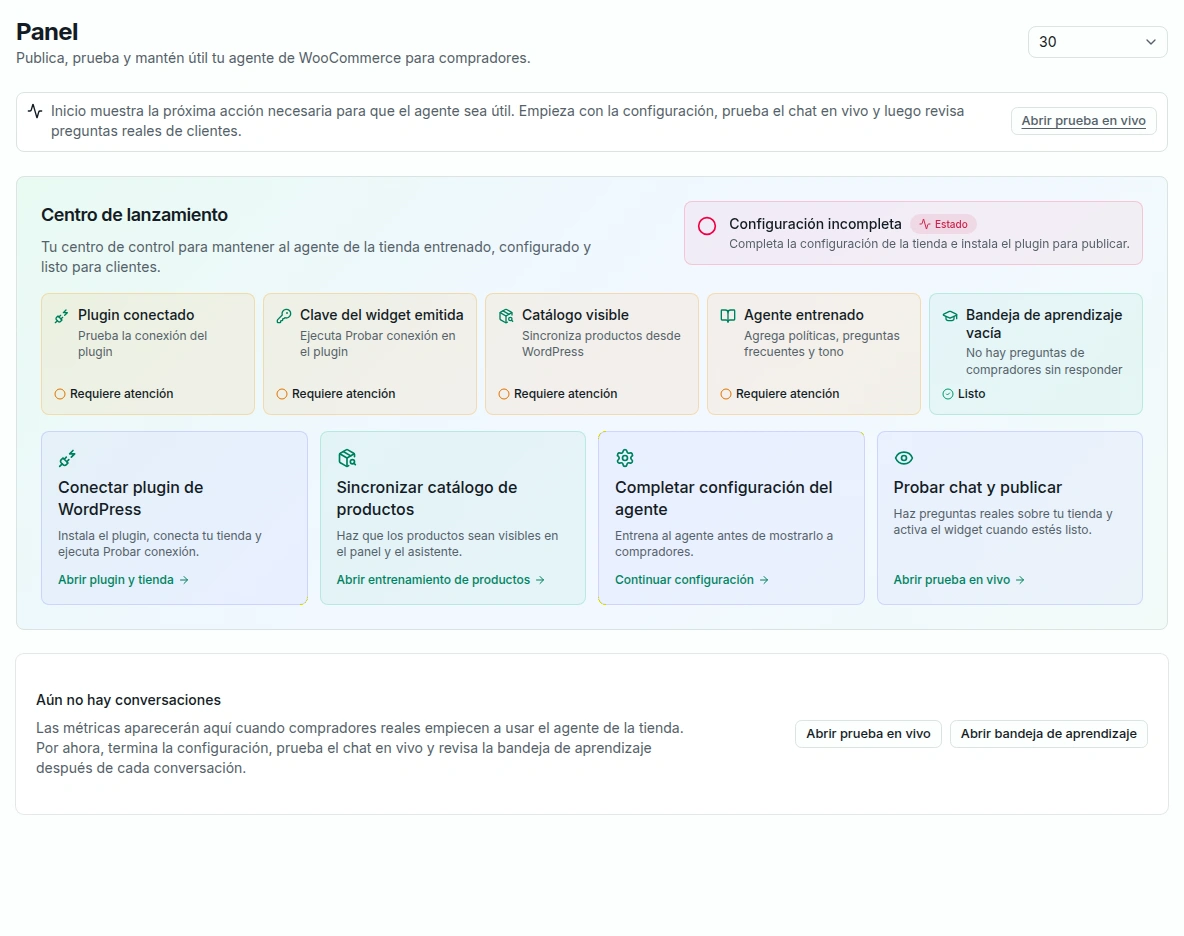
MSA Dashboard
MyStoreAssistant dashboard showing the Launch Center setup checklist
Pricing

Simple monthly plans. 14-day free trial on all of them.

All plans include the WooCommerce plugin, catalog-trained AI assistant, storefront widget, guided setup, usage dashboard and self-service billing. One subscription per account. USD $0 due today.

Starter

For stores getting started with AI answers.

$20 /month

  • 300 AI conversations/month
  • WooCommerce plugin
  • Catalog-trained storefront widget
  • Guided setup
  • Usage dashboard
  • 1 active store
Start 14-day free trial

Scale

For high-volume stores with heavy chat usage.

$100 /month

  • 4,000 AI conversations/month
  • Everything in Growth
  • Up to 10 active stores
Start 14-day free trial

No surprise overages.

The 14-day free trial begins only at your first successful store connection — not at signup. When your monthly AI conversations run out, the widget safely falls back to your contact option. You can upgrade anytime.

MSA AI is for WooCommerce storefront assistant workflows. WhatsApp, refunds, order changes and custom implementations are not included in this launch version.

Trust & control

You stay in control before it goes live.

Nothing is shown to your customers until you've tested it and switched the widget on.

Test answers before activating the storefront widget.
The assistant uses your catalog and configured store knowledge.
Unknown answers can fall back to your support contact.
Billing and cancellation are self-service, via Stripe.
WooCommerce required. MSA installs as a WordPress plugin and connects to your WooCommerce store.
FAQ

Questions before you start

Do I need WooCommerce?
Yes. MyStoreAssistant is built for WooCommerce — it installs as a WordPress plugin and connects to your WooCommerce store and catalog.
How do I install and update MyStoreAssistant?
After you create an account and save a payment method, download the plugin ZIP from your activation center and install it in WordPress (Plugins → Add New → Upload Plugin). Later updates arrive through MSA's private updater — you do not need the public WordPress.org plugin directory.
When does the 14-day free trial begin?
The 14-day free trial begins only at your first successful store connection — not at signup and not when you save a card. Until that connection succeeds, no trial clock or charge date is set.
How many stores can I connect?
Plans include 1 active store (Starter), up to 3 active stores (Growth), or up to 10 active stores (Scale). There is one subscription per account; additional stores share that account's trial and renewal dates.
Can I upgrade or downgrade my plan?
Upgrades apply immediately (paid accounts are prorated; during trial the future price and store limit change without an immediate charge or trial restart). Downgrades take effect at the next renewal and cannot be confirmed until your active stores fit the destination plan limit — you choose which stores to disconnect; MSA never automatically chooses or pauses stores for you.
Can I test it before customers see it?
Yes. The storefront widget stays off until you activate it. You can sync your catalog, train the assistant and test real shopper questions privately first.
What happens if a payment fails?
Service continues during a 3-day grace period while you update your card. After grace, the account enters suspension: widgets and sync pause across stores, and the dashboard is limited to billing and reactivation. A successful payment restores access without reconnecting or retraining.
What is the difference between disconnecting a store and canceling?
Disconnecting one store pauses that store's widget and sync, frees a plan slot, and retains that store's data — it does not cancel billing or the account subscription. Canceling ends the account subscription at period end and affects every store on the account.
How do cancellation, reactivation, and retention work?
Cancellation takes effect at the end of the trial or paid period (no charge if you cancel during trial before period end). After the period ends, service stops and account data enters 90-day retention. Reactivation during retention preserves stores and settings and never grants another trial.
What does the assistant learn from my store?
Your WooCommerce product catalog plus the store knowledge you configure — shipping, payments, returns, warranties and contact information.
Does it change orders, issue refunds or apply discounts?
No. The launch version does not modify orders, issue refunds or apply coupons. It answers questions and guides shoppers.
What happens when I reach my conversation limit?
The widget safely falls back to your configured contact option — no surprise overages. You can upgrade your plan anytime.
Does it work with WhatsApp?
Not in this launch version. MSA focuses on the storefront chat widget for your WooCommerce site.
How do I get support?
From your MSA dashboard — documentation for setup and connection, plus email support for account and billing questions.

Launch your WooCommerce AI assistant this week.

Plan → account → plugin → connect → sync → test → activate. All self-service, starting with 14 days free.